
Introduction
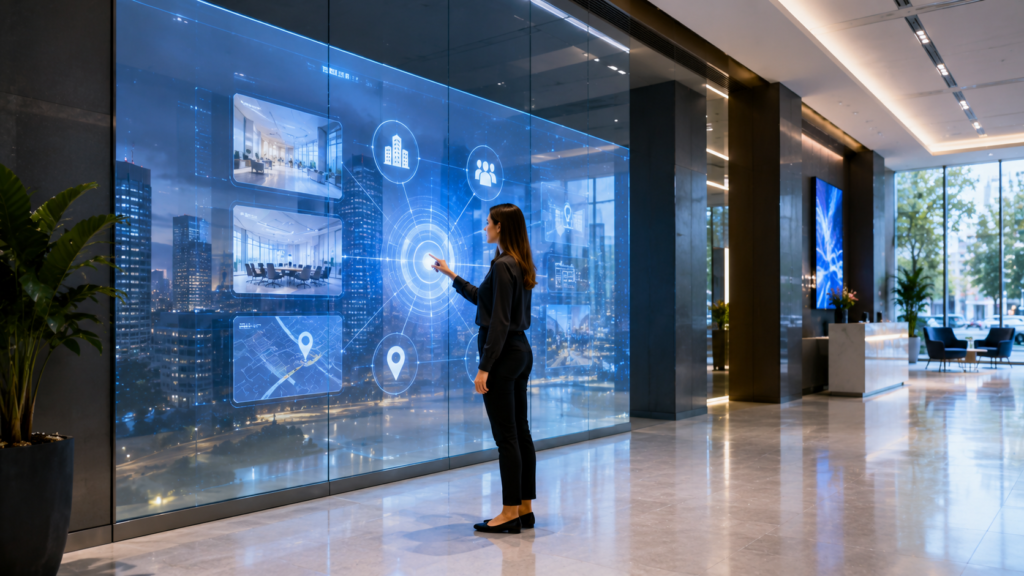
Interactive rear projection film helps businesses turn glass, acrylic, and Plexiglas into engaging digital display surfaces that can support touch, sensors, motion triggers, product exploration, wayfinding, lead capture, and immersive customer experiences. Instead of using glass only as a window, partition, or decorative feature, companies can transform it into an active communication tool.
For commercial buyers and decision-makers, this matters because customers now expect more than static information. They want fast answers, personalized experiences, and engaging environments. Therefore, businesses need display systems that do more than show content. They need displays that invite interaction.
Rear projection film becomes especially powerful when paired with interactive technology. A retail store can let shoppers browse products on glass. A museum can let visitors explore exhibit content. A hotel can provide digital wayfinding. A trade show booth can capture leads. A corporate lobby can welcome guests with branded interactive content. As a result, interactive rear projection film can support both customer experience and measurable business value.
Screen Solutions International offers several projection film options that can support commercial display projects, including Rear Projection Films, Definition Rear Projection Film, Accent Rear Projection Film, Intrigue Rear Projection Film, and Rear Projection Film Samples. SSI also supports related display technologies such as Interactive Kiosks, Digital Signage, Transparent OLED Displays, Transparent Displays, LED Video Walls, projection systems, and custom experiential displays.
For businesses that want to increase engagement, improve communication, and turn passive glass into an interactive experience, this technology offers a strong path forward.
What Is Interactive Rear Projection Film?
Interactive rear projection film starts with a specialized projection film applied to glass, acrylic, or Plexiglas. A projector displays digital content from behind the surface. Then, interactive hardware or software allows users to engage with that content.
Depending on the project, interactivity may come from:
- Touch overlays
- Infrared touch frames
- Motion sensors
- Cameras
- RFID triggers
- NFC triggers
- Gesture controls
- Mobile phone interactions
- Interactive kiosks
- Custom software
- Product recognition systems
- Proximity sensors
In practical terms, the glass becomes more than a display. It becomes an input surface or responsive experience.
For example, a customer may touch a glass storefront to explore product categories. A museum visitor may wave near a panel to reveal more information. A trade show attendee may scan a badge or tap a screen to request a demo. A hotel guest may use a glass wall to find a ballroom or restaurant.
Because the experience appears on glass, the result can feel more premium and futuristic than a standard touchscreen monitor.
Why Businesses Are Moving Toward Interactive Displays
Digital displays already help businesses communicate. However, interactive displays can do more because they create participation. When people interact with a display, they often spend more time with the content. They may also remember the experience more clearly.
As a result, interactive rear projection film can support several business goals:
- Increase dwell time
- Improve customer education
- Support lead capture
- Reduce staff workload
- Improve wayfinding
- Make product discovery easier
- Create memorable brand moments
- Support event engagement
- Provide self-service information
- Improve perceived innovation
In addition, interactive displays help bridge physical and digital experiences. A customer can stand in a real location while browsing digital content, viewing product options, watching videos, or submitting information.
Therefore, interactive rear projection film fits well in retail, corporate, healthcare, hospitality, museum, entertainment, automotive, education, and trade show environments.
How Interactive Rear Projection Film Works
Interactive rear projection film systems usually combine four main elements.
1. Projection Film
First, the projection film creates the visible image surface. The film applies to glass, acrylic, or Plexiglas. Depending on the chosen film, the display can look bright, clear, frosted, transparent, or holographic-style.
2. Projector
Next, the projector sends the content onto the film from behind the surface. Projector brightness, throw distance, resolution, and placement all affect performance.
3. Media Source or Software
Then, the system needs a media player, computer, or interactive software platform. This controls the visuals, user interface, videos, animations, forms, or real-time responses.
4. Interactive Input
Finally, the system needs a way to detect user input. This may be a touch frame, sensor, camera, RFID reader, NFC reader, or mobile integration.
When these elements work together, users can interact with the projected content in a natural way.
Best Applications for Interactive Rear Projection Film
Interactive rear projection film can fit many industries. However, it delivers the strongest value when users need to explore, learn, navigate, or take action.
Retail Product Discovery
Retailers can use interactive projection film to help shoppers browse products, compare features, view colors, check promotions, or explore related items.
For example, a store can turn a glass storefront into an after-hours interactive product browser. During business hours, the same display can show promotions and product videos. After closing, it can invite shoppers to scan a QR code or explore a digital catalog.
This helps the storefront keep working even when staff are unavailable.
Museums and Exhibits
Museums can use interactive glass displays to let visitors explore timelines, maps, artifact stories, videos, oral histories, educational diagrams, and layered exhibit content.
Instead of overwhelming guests with long text panels, museums can present a simple main visual and allow users to explore deeper information at their own pace.
This approach can improve engagement while keeping the exhibit clean and visually organized.
Trade Shows and Events
Trade show booths need fast engagement. Interactive rear projection film can help exhibitors create product demos, lead capture tools, quiz-based experiences, sponsor activations, or badge-triggered content.
For example, a visitor can tap a projected glass panel to choose an industry use case. Then, the display can show the relevant product benefits while a sales rep continues the conversation.
As a result, the display becomes a sales tool rather than a decorative feature.
Hotels and Hospitality
Hotels can use interactive projection film for lobby wayfinding, event schedules, restaurant information, spa promotions, local destination guides, and private event branding.
For example, guests can interact with a glass lobby display to find ballrooms, meeting rooms, lounges, or amenities. Additionally, event teams can update the same display for conferences, weddings, or corporate events.
Corporate Lobbies and Offices
Corporate offices can use interactive rear projection film to welcome visitors, show company history, display product information, support executive briefings, or guide guests through the building.
For recruiting, interactive lobby displays can show culture videos, employee stories, awards, and company milestones. For sales, they can show products, case studies, and demo paths.
Healthcare Facilities
Healthcare facilities can use interactive glass displays for wayfinding, patient education, wellness content, service directories, appointment instructions, and donor recognition.
However, healthcare teams should keep public-facing displays general and avoid protected health information unless the system is specifically designed and approved for compliant use.
Automotive Showrooms
Car dealerships can use interactive projection film to help customers compare models, explore EV charging, view safety features, schedule test drives, or learn about service packages.
This can make the showroom more useful while supporting the sales team.
Interactive Rear Projection Film vs. Standard Digital Signage
Interactive rear projection film and standard digital signage both have value. However, they serve different goals.
| Display Option | Best Use Case | Main Advantage | Key Consideration |
|---|---|---|---|
| Interactive Rear Projection Film | Glass-based customer engagement | Turns glass into a responsive digital experience | Requires interactive hardware and software planning |
| Standard Rear Projection Film | Video, branding, ambiance, promotions | Creates dynamic content on glass | Does not collect input unless paired with interactivity |
| Standard Digital Signage | Menus, directories, announcements | Easy to deploy and manage | Less unique visual impact |
| Interactive Kiosk | Self-service and lead capture | Strong user workflow control | Requires physical kiosk footprint |
| Transparent OLED Display | Premium see-through visual experiences | Futuristic transparent display effect | Higher-end display category |
| LED Video Wall | Large immersive impact | Bright and scalable | Larger visible hardware footprint |
In many projects, the best solution combines multiple tools. For example, a retail location may use interactive rear projection film on a storefront, digital signage inside the store, transparent OLED near a product showcase, and kiosks for customer service.
Business Value and ROI
From an ROI standpoint, interactive rear projection film can support measurable business outcomes.
First, it increases engagement. When users interact with content, they often spend more time with the brand, product, exhibit, or service.
Second, it improves education. Interactive content allows users to explore information based on their needs. Therefore, customers can understand products or services faster.
Third, it supports lead generation. Trade show booths, showrooms, and retail displays can collect contact information, demo requests, or interest signals when paired with the right software.
Fourth, it improves staff efficiency. Interactive wayfinding, FAQs, product guides, and service directories can answer common questions before staff need to step in.
Fifth, it creates stronger brand perception. A responsive glass display can make a business feel innovative, premium, and customer-focused.
Finally, it increases the value of existing architecture. Glass walls, windows, and partitions become useful digital assets instead of passive surfaces.
Choosing the Right Rear Projection Film
The best film depends on the environment, lighting, interaction type, viewing distance, and visual style.
Definition Rear Projection Film
Definition Rear Projection Film works well when image clarity matters. It can support polished interactive product displays, corporate experiences, museum content, and retail visuals.
Accent Rear Projection Film
Accent Rear Projection Film can support high-brightness projection in light-controlled environments. It can also work well where a frosted or architectural film appearance fits the design.
Intrigue Rear Projection Film
Intrigue Rear Projection Film can create a holographic-style floating image effect. This can support premium brand activations, futuristic retail, automotive showrooms, trade shows, and experiential installations.
Rear Projection Film Samples
Before scaling an interactive project, businesses should test Rear Projection Film Samples. Sample testing helps teams evaluate brightness, clarity, touch compatibility, viewing angle, and visual effect.
Content Strategy for Interactive Displays
Interactive displays need a different content strategy than passive video loops. The experience should feel intuitive, fast, and useful.
Start With One Clear Action
Users should know what to do immediately. For example, “tap to explore,” “choose a product,” “find your room,” or “start the demo.” However, public-facing copy should remain short and simple.
Keep the Interface Simple
A complex interface can discourage interaction. Therefore, use large buttons, clear categories, and simple navigation.
Design for Standing Users
Most users will interact while standing. As a result, content should use comfortable touch zones, readable type, and simple pathways.
Use Short Videos
Short videos work better than long clips. Users should be able to learn something quickly and move to the next step.
Create a Strong End Point
Every interaction should lead somewhere useful. That may be a product recommendation, lead form, map, QR code, appointment request, coupon, or staff handoff.
Installation Planning
Interactive rear projection film requires careful planning because it combines display hardware, software, input technology, and physical installation.
Important planning factors include:
- Glass size and surface condition
- Film type
- Projector brightness
- Projector throw distance
- Interactive input method
- Touch accuracy
- Viewing distance
- User height and reach
- ADA accessibility considerations
- Cable routing
- Power access
- Media player location
- Software requirements
- Internet connection
- Content management
- Cleaning procedures
- Maintenance access
- Safety requirements
- Staff training
Additionally, businesses should test the full user experience before launch. A display may look impressive, but the interaction must feel smooth.
Common Mistakes to Avoid
Making the Interface Too Complicated
Interactive displays should feel easy. If users need instructions for every step, the design needs refinement.
Using Content Designed for a Website
A website interface does not always work on glass. Interactive projection displays need larger visuals, fewer steps, and simpler navigation.
Ignoring Touch Accuracy
If touch input does not line up with the projected content, users will get frustrated. Therefore, calibration matters.
Forgetting Lighting Conditions
Projection quality depends on ambient light, projector brightness, and film selection. Test the display in real conditions before launch.
Not Assigning a Content Owner
Interactive content needs updates. Assign a team member or partner to maintain the experience after installation.
Future Trends in Interactive Rear Projection Film
Looking ahead, interactive rear projection film will continue moving toward more personalized, responsive, and data-connected experiences.
First, more businesses will use sensor-based displays. Instead of requiring touch, displays may respond to proximity, gestures, or object placement.
Second, retail and showrooms will use more product recognition. When a customer picks up or scans a product, the display can show related content.
Third, trade show booths will connect interactive displays to lead systems. This can help sales teams capture interest and follow up faster.
Fourth, museums and educational spaces will use interactive glass to make complex topics easier to explore.
Finally, AI-driven content may help displays adapt based on user choices, location, audience type, or time of day.
FAQ
What is interactive rear projection film?
Interactive rear projection film combines projection film on glass with touch, sensors, cameras, RFID, NFC, or software controls. This allows users to interact with projected digital content.
Can rear projection film become a touchscreen?
Yes. Rear projection film can support touch-style experiences when paired with the right touch overlay, infrared frame, sensor system, or interactive hardware.
Where can businesses use interactive rear projection film?
Businesses can use it in retail stores, museums, hotels, corporate offices, trade show booths, healthcare facilities, automotive showrooms, restaurants, and entertainment venues.
Is interactive rear projection film good for lead capture?
Yes. When paired with software, interactive rear projection film can support forms, demo requests, badge scans, QR codes, product interest tracking, and sales handoffs.
Does interactive rear projection film need custom software?
Often, yes. Some projects can use simple media playback or kiosk software. However, more advanced experiences usually need custom interface design and software development.
Why Choose Screen Solutions International
Screen Solutions International helps businesses create display systems that support engagement, communication, and ROI. SSI offers rear projection films as well as interactive kiosks, digital signage, transparent OLED displays, LED video walls, high-bright displays, projection technologies, and custom experiential displays.
This broader product knowledge matters because interactive projects often require more than one component. A successful installation may need projection film, a projector, touch hardware, software, media playback, content design, and integration support. SSI can help buyers compare options, test samples, and plan a complete display strategy.
Explore Rear Projection Films, review Projection Film Options, or call 888-631-5880 to discuss your interactive projection film project.
Final Takeaway
In summary, interactive rear projection film helps businesses turn glass into a responsive digital experience. It can support customer engagement, product education, wayfinding, lead capture, event activation, and premium brand storytelling.
Most importantly, it turns passive glass into a functional business tool. Instead of simply showing content, interactive rear projection film invites users to participate, explore, and take action.
To start planning an interactive rear projection film display, contact Screen Solutions International at 888-631-5880 or explore available solutions at SSIDisplays.com and RearProjectionFilms.com.
Sources
Internal SSI Links
- Rear Projection Films – Screen Solutions International
- Projection Film Options
- Definition Rear Projection Film
- Accent Rear Projection Film
- Intrigue Rear Projection Film
- Rear Projection Film Samples
- Transparent OLED Displays
- Transparent Displays