
Introduction
Rear projection film maintenance helps businesses protect the long-term performance of glass-based digital displays. After a rear projection film installation goes live, the work does not stop. The film, glass, projector, content, lighting, and media system all need basic care so the display keeps looking clean, bright, and professional.
For commercial buyers, this matters because rear projection film is often used in high-visibility spaces. Retail storefronts, corporate lobbies, museums, hotels, healthcare facilities, trade show booths, car dealerships, restaurants, and showrooms all depend on visual impact. A display that looks sharp on day one should still look strong months later.
Rear projection film turns glass, acrylic, or Plexiglas into a digital display surface. A projector sits behind the surface and sends content onto the film. Viewers see the image from the front side. As a result, businesses can create a premium digital display without placing a standard screen in the main viewing area.
However, dust, fingerprints, glare, projector misalignment, outdated content, surface damage, and poor cleaning routines can reduce the quality of the display over time. Fortunately, a simple maintenance plan can prevent many of these issues.
RearProjectionFilms.com helps businesses understand how rear projection film works in real commercial environments. Screen Solutions International supports these projects through SSIDisplays.com with rear projection films, projection film samples, anti-glare film, digital signage, transparent displays, LED video walls, high-bright displays, interactive kiosks, projector enclosures, and custom experiential display systems. SSI’s projection film options include rear projection films designed for clean surfaces, along with sample packs that help buyers compare Accent, Definition, Intrigue, and Anti-Glare films before larger installations.
If your business wants its rear projection film display to keep performing, maintenance should be part of the plan from the beginning.
Why Rear Projection Film Maintenance Matters
Rear projection film can create a striking display effect, but commercial spaces are active environments. People walk by. Staff clean nearby surfaces. Sunlight changes throughout the day. Projectors run for long hours. Content schedules change. Meanwhile, dust and fingerprints can collect on glass surfaces.
Because of this, display quality can decline slowly if nobody owns the maintenance process.
A strong maintenance plan helps protect:
- Image clarity
- Brightness
- Contrast
- Film appearance
- Glass cleanliness
- Projector alignment
- Content accuracy
- Customer experience
- Brand perception
- Long-term ROI
A clean rear projection film display makes the business look more professional. In contrast, a dirty or outdated display can make even a premium installation look neglected.
Start With the Right Installation Plan
Maintenance begins before the film is installed. If the system is hard to access, difficult to clean, or poorly planned, upkeep becomes more frustrating later.
Before installation, buyers should confirm:
- How the glass will be cleaned
- Who will clean the film-facing surface
- Where the projector will sit
- How staff can access the projector
- How cables will be protected
- Where the media player will be located
- How content will be updated
- How ventilation will work
- Whether anti-glare support is needed
- Which team owns display maintenance
This planning step helps avoid problems after launch. A display can look seamless from the customer side while still allowing practical service access behind the scenes.
Keep the Glass Surface Clean
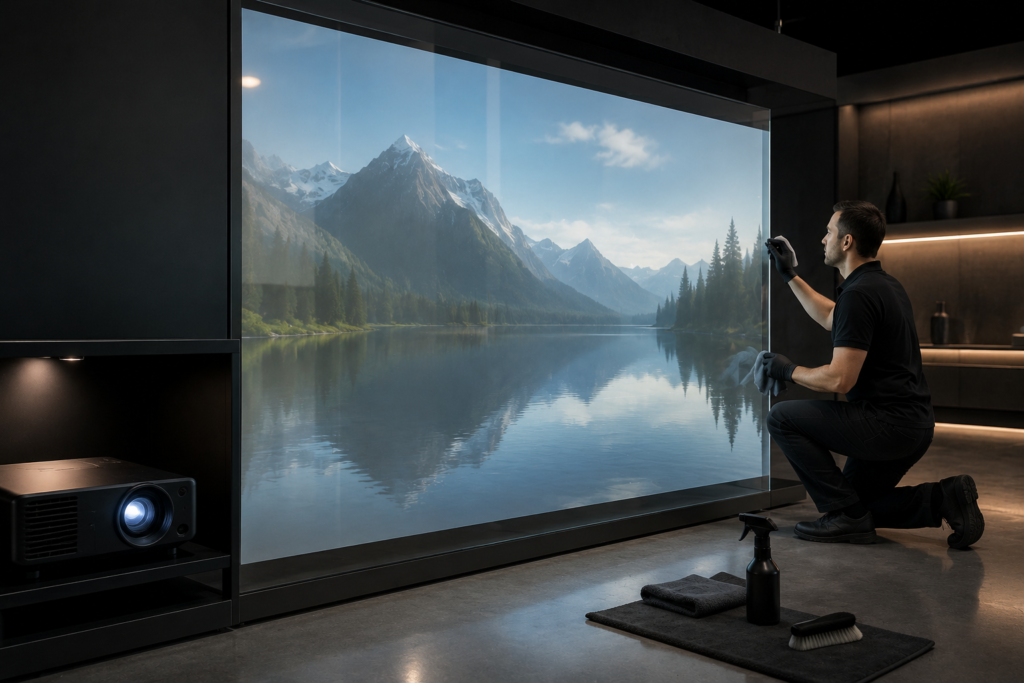
Glass cleanliness has a direct impact on rear projection film performance. Dust, smudges, fingerprints, streaks, and residue can make projected content look uneven or soft.
In many commercial settings, glass gets touched often. Storefronts collect fingerprints. Lobbies gather dust. Museums and exhibits attract close viewing. Restaurants and hospitality spaces may deal with cleaning spray, food residue, or hand marks near partitions.
For best results, create a routine glass-cleaning schedule.
Useful cleaning habits include:
- Use soft, non-abrasive cloths
- Avoid harsh scrubbing
- Follow film and installer cleaning recommendations
- Clean fingerprints quickly in public areas
- Avoid overspraying near film edges
- Keep cleaning chemicals away from electronics
- Inspect the glass under display lighting
- Check for streaks after cleaning
- Train staff on proper cleaning methods
The safest cleaning process depends on the film type, surface, and installation method. Therefore, businesses should follow the instructions provided with the film or installer guidance.
Protect the Film From Damage
Rear projection film is part of the display system, so it should be treated carefully. Scratches, peeling edges, pressure marks, and improper cleaning can reduce the appearance of the installation.
To protect the film, avoid:
- Abrasive pads
- Scrapers
- Harsh chemicals
- Excess moisture near edges
- Repeated impact
- Tape placed directly on the film
- Sharp tools near the surface
- Untrained staff handling the installation area
In public spaces, consider how people interact with the display. If guests may touch the glass often, staff may need more frequent cleaning and inspection. For interactive installations, the surface may need a dedicated cleaning routine because touch activity increases fingerprints.
Check Projector Alignment Regularly
Rear projection film needs a properly aligned projector. Over time, a projector can shift slightly because of vibration, accidental contact, maintenance work, or mounting movement.
Even a small shift can affect the image.
Signs of projector alignment problems include:
- Image no longer fills the film area
- Content appears crooked
- Edges look uneven
- Text appears distorted
- Important visuals fall outside the display zone
- Seams no longer line up with the content
- Image appears soft in one area
A monthly alignment check can prevent small issues from becoming noticeable. For high-traffic commercial spaces, weekly visual checks may be even better.
Maintain the Projector
The projector is just as important as the film. If the projector loses brightness, overheats, collects dust, or falls out of focus, the display quality will suffer.
Projector maintenance may include:
- Checking air filters
- Confirming ventilation
- Cleaning around the projector area
- Inspecting cables
- Reviewing focus
- Checking brightness settings
- Confirming color output
- Monitoring fan noise
- Verifying operating hours
- Scheduling lamp or laser maintenance when applicable
Projector type matters. Lamp-based projectors may require bulb replacement, while laser projectors often offer longer operating life. Either way, buyers should follow the manufacturer’s maintenance recommendations.
Additionally, projector ventilation should never be ignored. A projector in a tight cabinet, ceiling pocket, or hidden enclosure needs airflow. Without proper ventilation, heat can shorten equipment life and reduce reliability.
Review Content Often
Rear projection film maintenance is not only physical. Content also needs upkeep.
A display with outdated messaging can create confusion. For example, a hotel display may show an old event schedule. A dealership may promote an expired offer. A retail storefront may show last season’s campaign. A healthcare lobby may display old service hours.
Because digital content can change easily, businesses should update it regularly.
A content maintenance plan should include:
- Current promotions
- Updated event schedules
- Fresh product visuals
- Seasonal campaigns
- Correct hours
- Active service information
- Updated wayfinding
- Current brand graphics
- New video loops
- Retired expired content
AVIXA notes that modern digital signage can use cloud-based content management systems that allow real-time updates across multiple displays. That broader trend matters for rear projection film projects as well because content workflow affects long-term display value.
Schedule Day and Night Visibility Checks
Rear projection film displays can look different throughout the day. Morning light, afternoon sun, evening reflections, and nighttime lighting all affect visibility.
Because of that, businesses should check the display during the hours it actually runs.
For example:
- A storefront should be checked during daytime and after dark
- A lobby should be checked during peak daylight
- A restaurant should be checked during lunch and dinner lighting
- A trade show display should be checked under venue lights
- A dealership display should be checked during bright showroom hours
- A museum display should be checked during normal exhibit lighting
This routine helps teams catch glare, washout, reflections, or content readability problems before customers notice them.
Watch for Glare and Reflection Changes
Lighting conditions can change after installation. A new fixture, different furniture layout, seasonal sun angle, exterior signage, nearby screen, or polished surface can create new reflections.
When glare becomes a problem, review the display environment.
Possible fixes include:
- Adjusting lighting angles
- Changing content contrast
- Moving bright objects near the display
- Repositioning furniture
- Reviewing projector brightness
- Adding anti-glare support where appropriate
- Updating content for stronger visibility
- Testing a different viewing zone
SSI offers anti-glare film that can support rear projection film projects by reducing front-side glare and reflection when placed correctly. Anti-glare film does not replace rear projection film. Instead, it can help improve visibility when reflections interfere with the viewing experience.
Keep Content High Contrast
Content that looked good during installation may become less effective if lighting changes or the display environment evolves. Therefore, businesses should review content contrast during maintenance checks.
High-contrast visuals usually perform better on rear projection film because they remain easier to see from a distance.
Effective content often includes:
- Large visuals
- Strong subject separation
- Short text
- Bright focal points
- Simple backgrounds
- Clean motion
- Minimal visual clutter
- Readable typography
- Color choices that stand out on glass
Avoid weak content such as low-contrast graphics, tiny text, dense paragraphs, or overly busy backgrounds. Even with a clean film and strong projector, poor content can make the display feel dim or hard to understand.
Maintenance Checklist for Rear Projection Film Displays
Use this checklist to keep a rear projection film display performing well.
| Maintenance Area | What to Check | Suggested Frequency |
|---|---|---|
| Glass Surface | Dust, fingerprints, streaks, residue | Daily or weekly in public areas |
| Film Condition | Scratches, peeling, edge issues, pressure marks | Weekly |
| Projector Alignment | Image position, focus, edge fit | Monthly |
| Projector Health | Ventilation, filters, cables, fan noise | Monthly |
| Content Accuracy | Promotions, hours, events, wayfinding | Weekly or monthly |
| Brightness | Image strength during operating hours | Monthly |
| Reflections | Glare from lights, windows, floors, objects | Monthly |
| Media Player | Playback, schedule, file updates | Monthly |
| Cleaning Supplies | Approved cloths and cleaning products | As needed |
| Staff Ownership | Assigned person or team for updates | Review quarterly |
This simple schedule helps businesses prevent small issues from weakening the display.
Maintenance Tips by Commercial Space
Different environments need different maintenance priorities.
Retail Storefronts
Retail storefronts usually need frequent cleaning because glass faces customer traffic, weather, dust, and fingerprints. Content should also update often to support current campaigns.
Corporate Lobbies
Corporate lobbies should focus on polished appearance. Staff should check fingerprints, reflections, and brand content regularly.
Museums and Exhibits
Museums should protect the film from visitor contact and cleaning mistakes. Exhibit lighting should be checked often because reflections can affect interpretation.
Hotels and Hospitality
Hotels should update event content frequently. Lobby displays, restaurant partitions, and ballroom glass may need different cleaning schedules.
Healthcare Facilities
Healthcare displays should remain clean, calm, and accurate. Content should avoid outdated instructions or service information.
Trade Shows
Trade show displays need pre-show testing, daily cleaning, and fast troubleshooting. Since setup conditions change quickly, teams should inspect everything before show opening each day.
Car Dealerships
Dealerships should check glare during bright daylight and update sales, service, and finance content often. Expired offers should come down immediately.
Common Maintenance Mistakes to Avoid
No Assigned Display Owner
If nobody owns the display, updates and inspections may stop. Assign responsibility to marketing, facilities, AV, operations, or a vendor.
Harsh Cleaning Methods
Aggressive cleaning can damage film or leave streaks. Use approved methods and train staff.
Ignoring Projector Heat
Projectors need ventilation. A hidden projector still needs airflow and maintenance access.
Letting Content Go Stale
Old content makes the display feel neglected. Set a content update schedule before launch.
Forgetting Real-World Viewing Conditions
A display should be checked from the customer’s path, not only from the installer’s perfect angle.
Skipping Sample Testing for Replacement Areas
If film needs to be expanded or replaced, test samples again when lighting or surface conditions have changed.
Energy and Operating Considerations
Rear projection film displays depend on projector operation, media playback, and scheduling. Because of that, businesses should consider operating hours carefully.
A display does not always need to run 24/7. For example, a storefront may run only during peak foot traffic and evening hours. A lobby display may shut down after business hours. A trade show display may follow event schedules.
ENERGY STAR notes that certified signage displays use more efficient and cooler-running panel technologies than conventional options. Although rear projection film uses projection equipment rather than a flat signage display, the same principle applies: display systems should be managed for performance and operating efficiency.
Useful operating habits include:
- Use schedules instead of leaving systems on constantly
- Turn off displays when not needed
- Choose equipment suited to the duty cycle
- Keep projectors ventilated
- Review brightness settings
- Update content instead of increasing brightness unnecessarily
- Coordinate with building energy goals
A well-managed system can protect both visual performance and operating costs.
Future Trends in Rear Projection Film Maintenance
Rear projection film maintenance will continue becoming more connected and easier to manage.
First, more businesses will use remote content management systems. This will make it easier to update rear projection displays across multiple locations.
Next, projectors and media players will offer better monitoring tools. Teams may track uptime, brightness, temperature, and playback status more easily.
Additionally, interactive rear projection film displays will need more formal cleaning routines. As more users touch glass displays, surface care will become even more important.
Meanwhile, glare control will remain a major concern in bright commercial spaces. Anti-glare support, better content design, and smarter lighting plans will help businesses keep displays readable.
Finally, buyers will expect longer display life. That means maintenance planning will become part of the original project scope, not an afterthought.
FAQ
How do you maintain rear projection film?
Maintain rear projection film by cleaning the glass carefully, protecting the film from scratches, checking projector alignment, maintaining the projector, updating content, and reviewing visibility during real operating hours.
Can rear projection film be cleaned?
Yes, but cleaning should follow the film supplier or installer recommendations. Use soft materials, avoid harsh scrubbing, and keep aggressive chemicals away from the film and edges.
Why does my rear projection film display look dim over time?
A dim display may result from projector brightness loss, dirty glass, poor content contrast, lighting changes, misalignment, or glare. Check the full system before replacing the film.
How often should rear projection film displays be inspected?
Public-facing displays should receive quick visual checks weekly. Projector alignment, content accuracy, reflections, and maintenance access should be reviewed monthly or based on traffic level.
Does anti-glare film help rear projection film displays?
Anti-glare film can help when front-side reflections reduce visibility. It supports rear projection film in reflective environments, but it should be planned based on the specific glass, lighting, and viewing conditions.
Why Choose Screen Solutions International
Screen Solutions International helps businesses plan rear projection film displays that work in real commercial environments. SSI offers rear projection films, film samples, anti-glare film, transparent displays, digital signage, LED video walls, high-bright displays, interactive kiosks, projector enclosures, and custom experiential display solutions.
That product range matters because long-term display performance depends on more than film. Buyers need the right projector, surface, lighting plan, content workflow, and maintenance strategy.
For rear projection education and ideas, visit RearProjectionFilms.com. To review product options and get project support, visit SSIDisplays.com. For project help, call 888-631-5880.
Final Takeaway
Rear projection film maintenance protects the quality, visibility, and business value of a glass-based display. Clean surfaces, proper projector care, updated content, glare checks, and routine inspections can help the installation look professional over time.
In summary, rear projection film can create a premium display experience, but it needs a practical maintenance plan. By assigning ownership, cleaning carefully, checking projector alignment, refreshing content, and reviewing visibility during real operating hours, businesses can keep their rear projection film displays looking sharp and effective.
To plan a rear projection film project or improve an existing installation, visit RearProjectionFilms.com or call Screen Solutions International at 888-631-5880.
Sources
Internal SSI Links
- SSIDisplays.com
- Rear Projection Films
- Projection Film Options
- Rear Projection Film Samples
- Definition Rear Projection Film
- Accent Rear Projection Film
- Intrigue Rear Projection Film
- Anti-Glare Film