Introduction
Rear projection film content design plays a major role in how well a glass display performs. A business can choose the right film, projector, and installation location, yet still end up with a weak display if the content is not designed for projection on glass.
For commercial buyers, this matters because rear projection film is not the same as a laptop screen, printed sign, website banner, or standard TV display. Glass changes how visuals appear. Ambient light changes contrast. Viewing distance affects readability. Reflections can compete with the image. In addition, customers may only look at the display for a few seconds before deciding whether to stop, enter, scan, ask questions, or keep walking.
Therefore, content should be planned specifically for rear projection film.
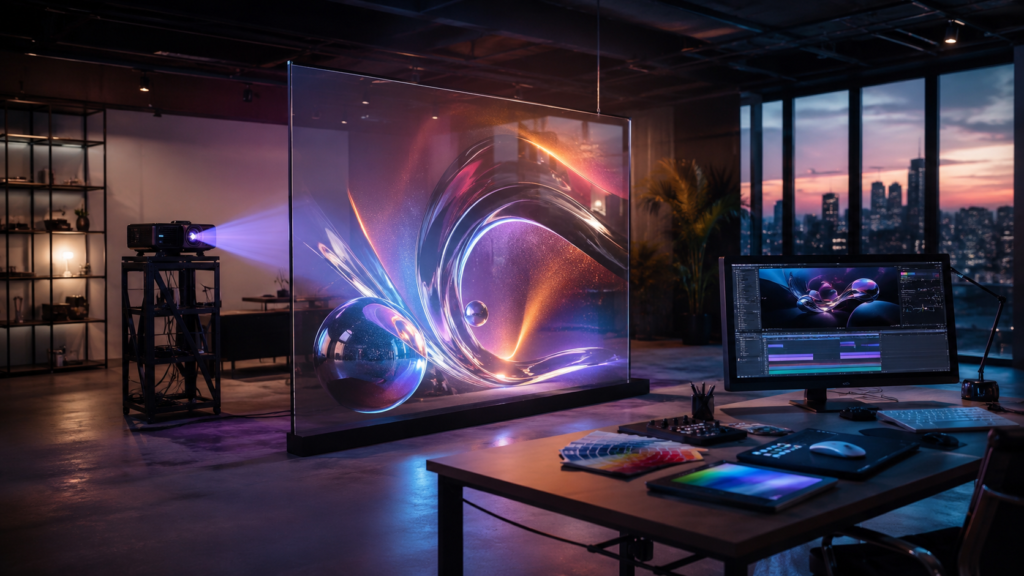
Rear projection film turns glass, acrylic, or Plexiglas into a digital display surface. A projector sits behind the surface and projects content onto the film. Viewers see the image from the front side. As a result, businesses can create sleek digital displays in storefronts, lobbies, museums, showrooms, event booths, hospitality spaces, healthcare facilities, restaurants, and corporate environments.
However, the display surface alone does not guarantee results. Strong content helps the installation attract attention, communicate clearly, and support ROI.
RearProjectionFilms.com helps businesses understand how rear projection film can turn glass into a commercial display surface. Screen Solutions International supports these projects through SSIDisplays.com with rear projection films, film samples, projection film options, anti-glare film, digital signage, transparent displays, LED video walls, interactive kiosks, and custom display systems.
If your rear projection film display needs to look sharper, clearer, and more effective, start with the content.
Why Content Design Matters for Rear Projection Film
Rear projection film displays often appear in high-value commercial spaces. They may face shoppers, guests, patients, visitors, executives, attendees, or customers. Because of that, the content must communicate quickly.
A rear projection display usually has a different job than a traditional screen. A standard screen may show detailed menus, schedules, or dashboards. By contrast, a rear projection film display often needs to create attention and atmosphere first. It may need to stop foot traffic, guide visitors, explain a product, support an exhibit, or reinforce a premium brand experience.
Because of that, the best rear projection film content is usually:
- Bold
- Simple
- High contrast
- Motion-friendly
- Easy to read
- Designed for distance
- Built around one message at a time
- Visually clean
- Matched to the lighting environment
- Created for the glass surface
In other words, the content should not be treated as an afterthought. It should be part of the project from the beginning.
Start With the Purpose of the Display
Before creating visuals, define what the rear projection film display needs to accomplish. A display without a clear purpose can look attractive but fail to support the business.
Common content goals include:
- Attract foot traffic
- Promote a product
- Explain a service
- Improve wayfinding
- Create atmosphere
- Educate visitors
- Support a product launch
- Highlight a brand story
- Promote an event
- Increase dwell time
- Support lead capture
- Make a space feel premium
Once the goal is clear, the content direction becomes easier.
For example, a retail storefront display should use bold visuals that attract shoppers from a distance. A museum display should use educational visuals that support the exhibit. A corporate lobby display should use polished brand content. A trade show display should use short product loops that start conversations. A restaurant display should support mood without distracting guests.
Therefore, content design should always begin with the business goal.
Use High Contrast for Better Visibility
High contrast is one of the most important content design rules for rear projection film. Glass displays often compete with reflections, ambient light, and movement in the space. Low-contrast visuals can quickly become hard to see.
To improve visibility, use strong separation between the subject and the background. For example, a bright product on a darker background may work better than a pale product on a light background. Similarly, white or bright graphics may stand out more clearly when placed over deep blue, charcoal, or rich gradient backgrounds.
Avoid low-contrast combinations such as:
- Light gray text on white
- Pale blue on light gray
- Thin white lines on bright backgrounds
- Dark text on dark video
- Busy imagery behind important information
- Subtle tone-on-tone messaging
Instead, use:
- Clear light-dark contrast
- Bright focal elements
- Strong subject separation
- Large shapes
- Deep backgrounds
- Simple gradients
- Clean negative space
As a result, viewers can understand the display faster.
Keep Text Short and Large
Text is often the biggest problem in rear projection film content. Businesses frequently try to place too much information on the display. However, most viewers will not stand still and read long paragraphs on glass.
Rear projection film content should use short, direct messaging.
Good text examples include:
- “New Collection”
- “Explore the Experience”
- “Now Showing”
- “Tap to Begin”
- “Featured Vehicle”
- “Welcome Guests”
- “Visit the Showroom”
- “See What’s New”
- “Discover More”
- “Event Entrance”
For best readability, use large type, simple fonts, and short phrases. In addition, avoid placing important text across glass seams, mullions, or panel breaks.
If a message needs more explanation, use another support channel. For example, add a QR code, nearby digital kiosk, printed detail card, website link, salesperson, or interactive screen. The projection film display should create interest and communicate the headline. It does not need to carry every detail.
Design for Viewing Distance
Rear projection film content should match the viewer’s distance from the display. A storefront display may need to work from 10 to 50 feet away. A museum panel may be viewed from 3 to 8 feet away. A trade show display may need to attract people from across the aisle. A corporate lobby wall may need to look good from both the entrance and the reception desk.
Therefore, content should be tested at real viewing distances.
Ask these questions:
- Will viewers walk past quickly?
- Will they stand close?
- Will they see the display from across a room?
- Will they view it through another glass surface?
- Will furniture block part of the display?
- Will the display need to work from several angles?
- Will people read it while moving?
As a general rule, the farther away the viewer is, the simpler the content should be. Use fewer words, larger visuals, and stronger contrast.
Use Motion Carefully
Motion is one of the biggest advantages of digital display content. It attracts attention and creates energy. However, too much motion can make a rear projection film display feel chaotic.
For commercial glass displays, subtle motion often works better than aggressive animation.
Strong motion choices include:
- Slow-moving light trails
- Product rotation
- Gentle abstract motion
- Cinematic footage
- Animated diagrams
- Looping environmental visuals
- Smooth transitions
- Soft particle movement
- Calm branded motion graphics
Weak motion choices include:
- Fast flashing effects
- Rapid cuts
- Crowded animation
- Too many moving elements
- Overly bright strobe-style visuals
- Text moving too quickly
- Busy backgrounds behind key information
Motion should guide attention, not fight for it.
For example, a retail window can use motion to reveal a product. A museum can use animation to explain a process. A dealership can show a vehicle driving through a scene. A hotel lobby can display slow atmospheric visuals. In each case, motion supports the message.
Match Content to the Film Type
Different rear projection films can create different visual effects. Therefore, content should match the chosen film.
Definition Rear Projection Film Content
Definition-style rear projection film works well with crisp visuals, strong contrast, product videos, branded loops, and commercial signage content. It is a strong fit when clarity and readability matter.
Content ideas include:
- Product videos
- Promotional graphics
- Brand visuals
- Lobby welcome content
- Retail campaigns
- Wayfinding support
- Educational diagrams
Accent Rear Projection Film Content
Accent-style film can support bright, vivid imagery in controlled lighting. It can work well for polished commercial visuals and frosted-style architectural displays.
Content ideas include:
- Hotel lobby visuals
- Corporate branding
- Museum interpretive graphics
- Restaurant atmosphere content
- Evening storefront campaigns
- Event welcome visuals
Intrigue Rear Projection Film Content
Intrigue-style film creates a more transparent or holographic-style visual effect. Therefore, content should lean into floating imagery, isolated subjects, light effects, silhouettes, and futuristic visuals.
Content ideas include:
- Floating product renders
- Holographic-style people or objects
- Abstract light forms
- Automotive concept visuals
- Retail activation content
- Museum artifact overlays
- Technology demos
- Trade show attention loops
When the content fits the film, the display looks more intentional.
Avoid Overcrowded Layouts
Rear projection film usually looks best when the design has breathing room. A cluttered layout can reduce impact, especially on glass.
Avoid placing too many elements on screen at once. Instead, build content around one focal point.
For example, instead of showing five products, five headlines, three icons, and a background video at the same time, show one hero product with one short message. Then, rotate to the next message in the loop.
This approach helps viewers process the display quickly. It also makes the content feel more premium.
A simple loop might include:
- Brand visual
- Hero product
- Benefit statement
- Lifestyle visual
- Call to action
- Repeat
This creates structure without overwhelming the viewer.
Plan for Glass Seams and Panel Breaks
Many rear projection film displays use large glass walls with multiple panels. Those panel seams can affect how content appears. Therefore, content should be designed around them.
Avoid placing important elements across seams, including:
- Faces
- Product details
- Headlines
- Logos
- QR codes
- Phone numbers
- Small icons
- Fine lines
- Important interface buttons
Instead, use seams as part of the layout. For example, each panel can hold a separate visual zone. Or the content can use abstract backgrounds that tolerate panel divisions.
In addition, designers should ask for glass measurements before creating the final content. This helps them avoid surprises during installation.
Use Loops That Make Sense at Any Starting Point
Rear projection film displays often run on loops. Viewers may begin watching at any moment. Therefore, the content should make sense no matter when someone looks at it.
Avoid creating a long story that only works from the beginning. Instead, create short scenes that each communicate something useful.
A good loop should:
- Start quickly
- Communicate visually
- Avoid long intros
- Repeat smoothly
- Keep each message short
- Work without sound
- Make sense from any entry point
- Avoid dead frames
- Maintain consistent visual style
For most commercial uses, loops between 10 and 45 seconds can work well. However, the right length depends on the environment. A storefront may need a short attention loop. A museum may use a longer educational sequence. A hotel lobby may use a slow atmospheric loop.
Design Without Relying on Sound
Most rear projection film displays should work without sound. Storefronts, lobbies, showrooms, hospitals, restaurants, and trade shows may not support audio clearly. Even when audio exists, viewers may not hear it.
Therefore, the visual content should stand on its own.
Use:
- Clear visuals
- Simple icons
- Short captions
- Visual demonstrations
- Motion cues
- Before-and-after imagery
- Product close-ups
- Directional graphics
If sound is important, add captions or visual reinforcement. However, keep captions short and readable.
Use Day and Night Versions When Needed
Some rear projection film displays operate in changing light conditions. A storefront may look different at noon than it does at night. A lobby may shift from daylight to evening lighting. A restaurant may run different moods at lunch and dinner.
Therefore, some businesses may benefit from separate content versions.
For example:
- Daytime version: brighter, higher contrast, bolder visuals
- Evening version: richer color, softer motion, more atmosphere
- Event version: branded welcome visuals
- Promotional version: product or offer focused
- Seasonal version: holiday or campaign based
This approach helps the display stay effective throughout the day.
Create Content for Real Business Outcomes
Rear projection film content should connect to measurable goals whenever possible. Attractive visuals matter, but the display should also support business value.
For retail, content may support foot traffic and product discovery. In hotels, it may support event messaging and amenity promotion. For dealerships, it may support vehicle education and showroom engagement. In museums, it may support learning and dwell time. For trade shows, it may support lead generation. For corporate offices, it may support brand perception and visitor experience.
Therefore, each content loop should answer one question: What should the viewer do or understand after seeing this?
Possible outcomes include:
- Enter the store
- Ask about a product
- Scan a QR code
- Visit a showroom
- Follow directions
- Attend an event
- Join a demo
- Explore an exhibit
- Book a service
- Notice the brand
- Remember the experience
Finally, a display that creates action delivers more value.
Rear Projection Film Content Checklist
Use this quick checklist before publishing content to a rear projection film display.
| Content Factor | What to Check |
|---|---|
| Goal | Does the content support a clear business objective? |
| Contrast | Can viewers see the main subject easily? |
| Text | Is the text short, large, and readable? |
| Motion | Does movement support the message? |
| Distance | Does the content work from real viewing distances? |
| Glass Seams | Are key elements away from panel breaks? |
| Loop | Does the content make sense at any starting point? |
| Lighting | Does it work in daytime and evening conditions? |
| Film Type | Does the visual style match the selected film? |
| Sound | Does the content work without audio? |
| CTA | Does the viewer know what to do next? |
| Updates | Can the content be refreshed over time? |
Common Content Mistakes to Avoid
Using Too Much Text
Rear projection film is not a brochure. Keep messaging short and visual.
Designing for a Computer Screen
Content that looks great on a laptop may not work on glass. Test on the actual display surface.
Ignoring Brightness and Contrast
Low-contrast visuals may disappear in bright environments. Use bold visual separation.
Using Generic Stock Videos
Generic content can make a premium display feel ordinary. Custom brand visuals usually perform better.
Forgetting the Viewer’s Path
Design for how people actually move through the space. A display should work from the approach angle, not only straight ahead.
Leaving Content Unchanged for Too Long
Digital displays should stay fresh. Update content for campaigns, seasons, products, events, and audience needs.
Future Trends in Rear Projection Film Content
Rear projection film content will continue becoming more dynamic, personalized, and interactive.
First, more businesses will create content specifically for glass surfaces instead of reusing standard screen videos.
Second, interactive content will become more common. Touch, sensors, cameras, RFID, NFC, and mobile triggers can turn rear projection film into a responsive display.
Third, AI-assisted content workflows may help businesses generate seasonal campaigns, product visuals, and localized content faster.
Fourth, data-driven content scheduling will grow. Displays may change based on time of day, audience, weather, event schedule, or promotion.
Finally, brands will use rear projection film content as part of larger experiential environments. Furthermore, glass displays, LED video walls, transparent OLED, digital signage, and projection mapping can work together to create stronger customer journeys.
FAQ
What type of content works best on rear projection film?
High-contrast visuals, large graphics, short text, clean motion, and simple layouts usually work best on rear projection film.
Can I use regular video content on rear projection film?
Yes, but it may need editing. Content designed for a TV, website, or social media may not perform well on glass without adjustments for contrast, scale, brightness, and viewing distance.
Should rear projection film content include text?
Yes, but text should be short and large. Additionally, avoid long paragraphs, small fonts, and detailed copy.
How long should a rear projection film content loop be?
Many commercial loops work well between 10 and 45 seconds. However, the best length depends on the setting, audience, and goal.
Does content need to change for daytime and nighttime?
Sometimes. Displays in storefronts, lobbies, restaurants, and other changing-light environments may benefit from separate daytime and evening content versions.
Why Choose Screen Solutions International
Screen Solutions International helps businesses plan rear projection film projects that look strong in real commercial environments. SSI offers rear projection films, projection film samples, anti-glare film, transparent displays, digital signage, LED video walls, high-bright displays, interactive kiosks, projector enclosures, and custom experiential display systems.
This matters because great rear projection film projects require more than film. They need the right content, projector, surface, lighting, and display strategy.
For rear projection education and ideas, visit RearProjectionFilms.com. For product options and project support, visit SSIDisplays.com. To discuss your project, call 888-631-5880.
Final Takeaway
Rear projection film content design is one of the most important parts of a successful glass display project. The film creates the surface, but the content creates the experience.
In summary, businesses should design rear projection film content with high contrast, short text, clean motion, strong focal points, and real viewing conditions in mind. By matching the content to the film type, environment, business goal, and audience path, companies can create clearer, more engaging, and more effective glass displays.
To start planning a rear projection film display, visit RearProjectionFilms.com or call Screen Solutions International at 888-631-5880.
Sources
Internal SSI Links
- SSIDisplays.com
- Rear Projection Films
- Projection Film Options
- Definition Rear Projection Film
- Accent Rear Projection Film
- Intrigue Rear Projection Film
- Rear Projection Film Samples
- Anti-Glare Film
- Transparent OLED Displays